Why Bother
Long-time readers will remember my Spot Instance post, which was all about keeping a single WordPress EC2 instance alive for a fraction of the on-demand price. It worked, but it was still a server: patching, disk, backups and a few minutes of outage while it recovered. This is the evolution of that idea. Take the server away entirely.
The result is a multi-tenant platform that runs real, unmodified WordPress on AWS Lambda, sold as managed SaaS under the Cloud Map Stack brand. Its first live sites are a local rugby referees' association and a rugby club, with more small-business sites coming across from shared hosting. The pitch to customers is deliberately not "serverless". Nobody running a physio clinic cares what a Lambda is. The pitch is the outcome: faster, cheaper, always online, and nothing to maintain.
The Architecture
Each tenant gets its own CDN distribution, its own function and its own private media storage, while sharing the underlying network and database layer. The trick that makes the economics work is how little traffic ever reaches PHP.
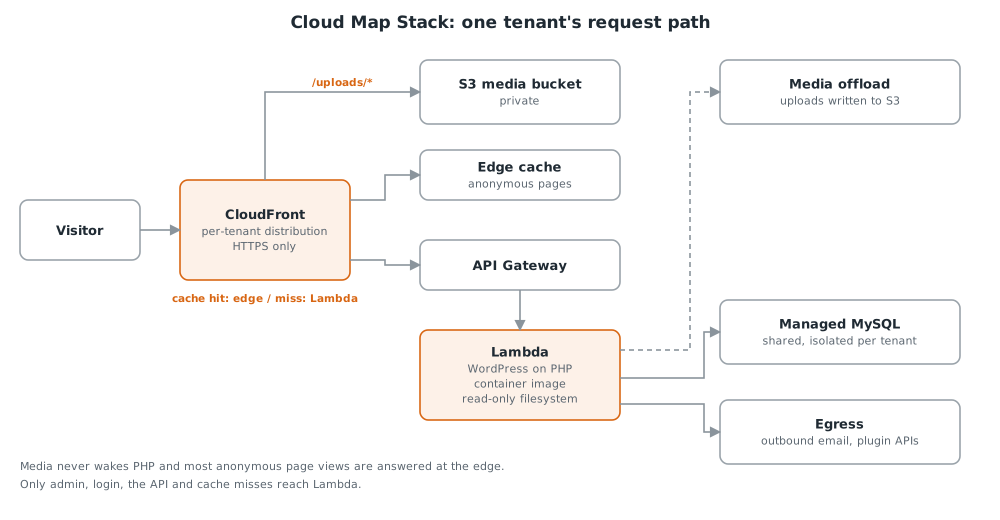
- The CDN does most of the work. Media is served straight from private storage and never touches PHP, static assets are cached aggressively, and anonymous page views are answered at the edge, while logged-in and admin traffic always goes to the origin. Publishing content refreshes the cache automatically.
- PHP runs on Lambda using the open-source Bref runtime, packaged as a container image, with a small router doing the job a web server normally would.
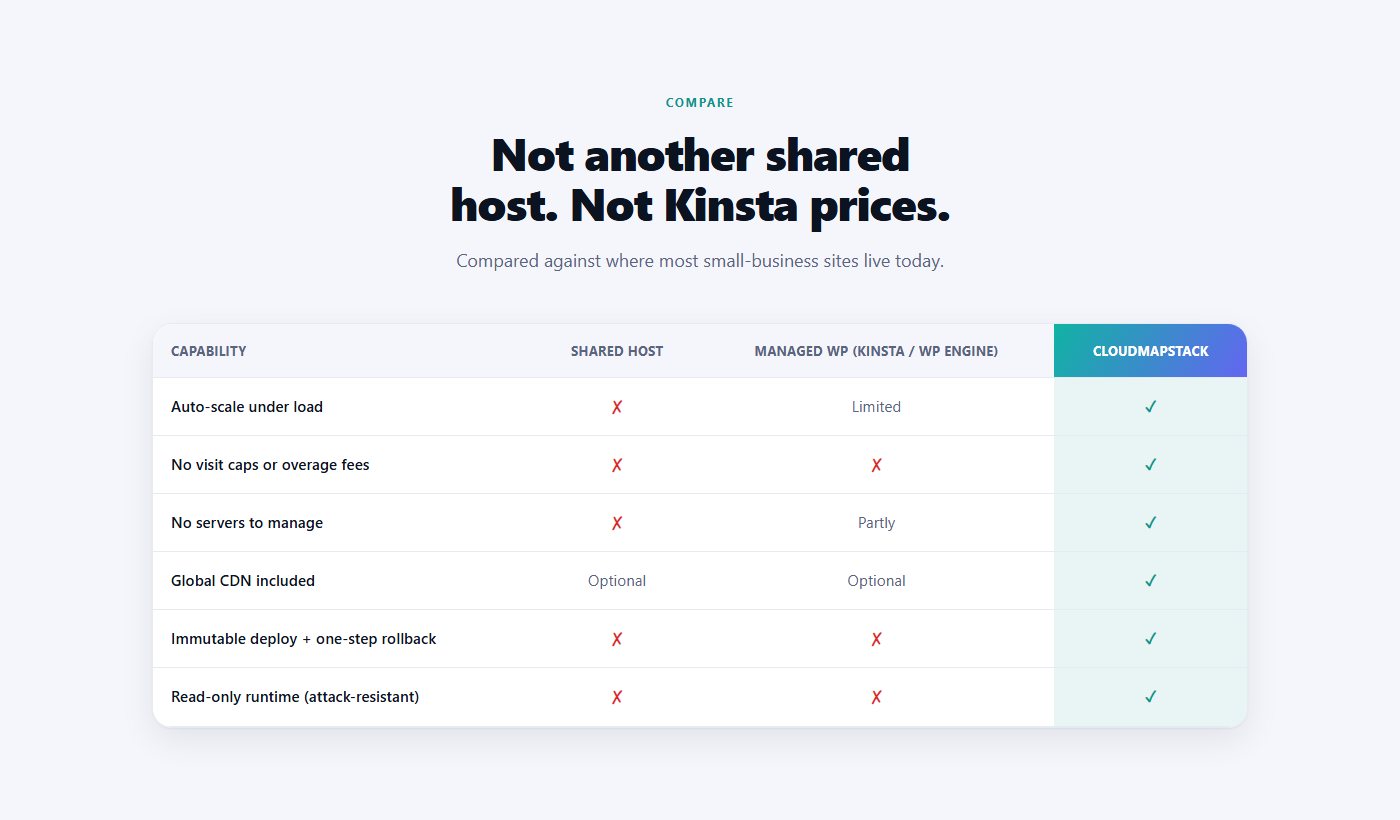
- Immutable releases. A versioned base image holds WordPress core and the platform's own plugins, and each tenant is that base plus their own themes and plugins. Upgrading WordPress is a deliberate, reversible deploy rather than something that happens to you at 2am.
- Loosely coupled infrastructure. The platform is split into independent CloudFormation stacks for the shared platform, each tenant, the control plane, provisioning, monitoring and security, so no stack can block another.
Security by Design
In 2026 the Australian Cyber Security Centre warned of a large-scale exploitation campaign against website content management systems, with WordPress and its plugins high on the list. Automated scanners, increasingly AI-assisted, hunt for known flaws in popular plugins (unauthenticated file uploads, remote code execution, server-side request forgery and unsafe deserialisation) and use them to plant a webshell. From there the attackers keep coming back: stealing credentials, planting more malware and moving into whatever else sits on the same network. Many of the victims are Australian small businesses, which is exactly who this platform is for.
On a traditional server, every step of that chain works. On this platform most of them cannot, and not because of a signature list that needs to keep up. The architecture itself takes the steps away.
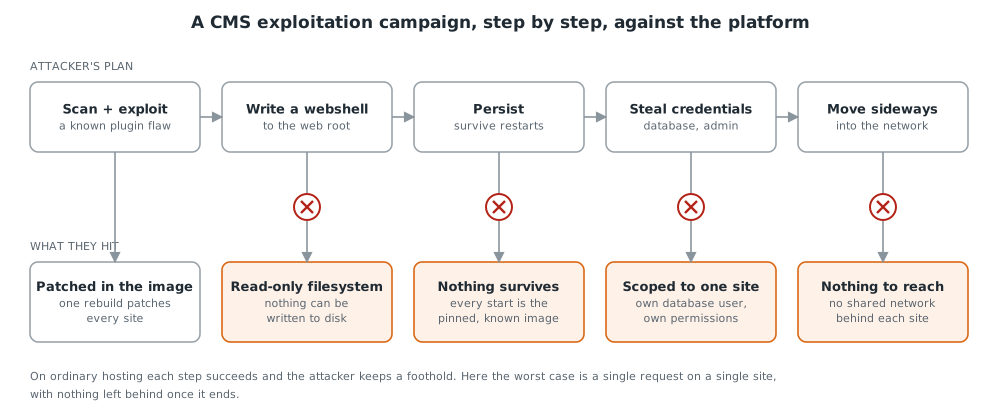
- A read-only filesystem. The campaign's whole goal is a webshell written to the web root. Here the web root cannot be written to at all. File creation is not monitored, it is impossible.
- Nothing survives. Every site runs from an immutable, version-pinned image. Sites run in short-lived containers that are routinely replaced, and every fresh start is the known-good image, so even a successful exploit has nowhere to persist.
- One site's blast radius. Each site has its own database user that can only see its own database, its own scoped permissions and its own private media storage. A stolen password opens one site, never the platform.
- Nothing to move to. There is no shared office network behind the sites to pivot into, which removes the campaign's final payoff.
- The risky paths are hardened. The import path that brings sites across from other platforms refuses unsafe deserialisation, fetches media only from an allowlist and guards against malicious XML.
- Repave in one step. If a site ever needs it, it can be torn down and rebuilt from the known-good image and its content, with nothing left behind.
None of this makes a vulnerable plugin safe, and nothing does. What it changes is the outcome and the clean-up. On ordinary hosting a successful exploit means a persistent foothold, a compromised server and a forensic clean-up. Here the worst case is a single request on a single site, with nothing left behind.
Patching in hours, not weeks
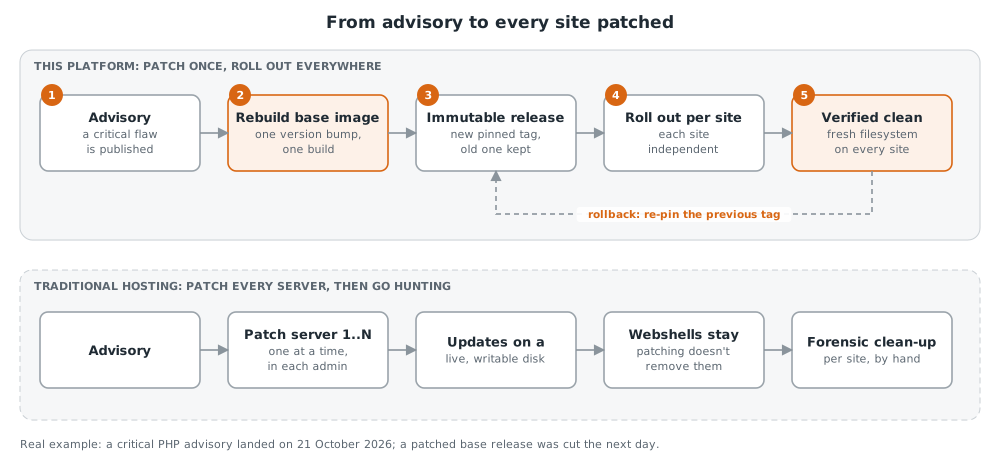
The other half is how fast a fix lands. WordPress core, PHP and the platform's own plugins are baked into a versioned base image, so a patch is one rebuild rather than a login to every server. Each site is then re-pinned to the new release independently, and every site that rolls forward also starts from a clean filesystem. If anything misbehaves, rolling back is re-pinning the previous release.
The Three Hard Problems
WordPress was designed for a long-lived server with a writable disk and a persistent database connection. Lambda offers none of those, which leaves three problems that have to be solved properly rather than worked around.
1. Media uploads with no writable disk
The filesystem is read-only, so every upload has to land in object storage instead, and every existing media URL has to keep working. It is a well-trodden path in principle, but there are sharp edges in practice around permissions and image processing.
2. Database connections and cold starts
Every function invocation needs its own database connection, and a database that scales to zero can take longer to wake up than the API gateway is prepared to wait. The first admin page after a quiet spell would simply fail. Solving it properly meant rethinking the database choice entirely (see below).
3. The VPC tax
Reaching a private database from Lambda means paying for outbound internet access, and AWS's managed option can cost more than the database it sits beside. The platform uses a self-managed, self-healing alternative instead, at a fraction of the cost, with alarms for when it is unhealthy.
Right-Sizing the Database
A serverless database that scales to zero looked perfect on paper: pay only for what you use. In practice it almost never reached zero, because background activity kept waking it, so the bill was far higher than a tiny database deserved.
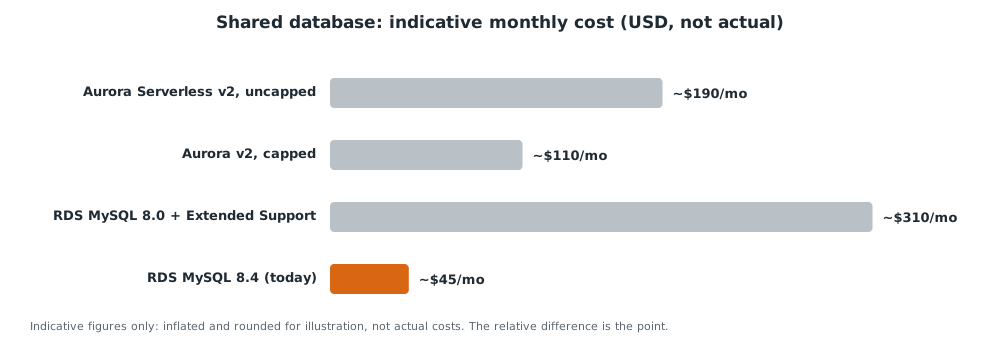
Capping the serverless option helped. A conventional instance looked cheaper still, until the support surcharge for an older engine version was added. The answer was a small, current-version instance shared across tenants with strict per-tenant isolation, which came in at a small fraction of where it started. The migration was done one tenant at a time, with an instant rollback for each, a soak period, and a final snapshot before the old database was retired.
Moving a Site
Moving an existing site is the part customers actually experience, so it is automated end to end.
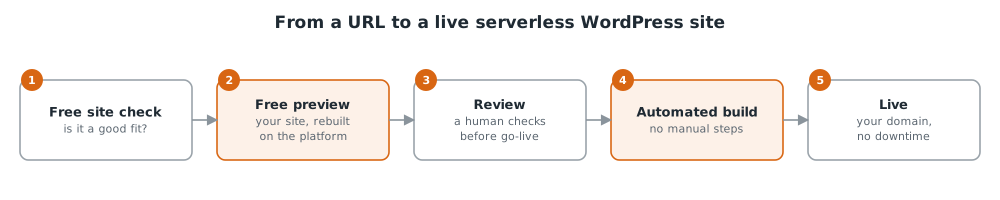
- A free check first. Any site can be assessed for fit before anyone signs up, so nobody is promised something the platform cannot deliver.
- Preview before paying. The customer sees their own site running on the platform before committing.
- It becomes real WordPress. Sites coming from other platforms are rebuilt as proper WordPress content they can edit, not a static copy.
- Go-live without downtime, with an instant way back if anything looks wrong.
Lessons Learnt
- "Works in WordPress" assumes a lot. Features like image cropping quietly depend on libraries a minimal runtime does not ship. Every one of those assumptions has to be found and handled in the base image.
- Build caches lie. A cached build once skipped changes it should have picked up. Deployments now force a fresh build where it matters.
- Cheap infrastructure needs real alerting. A cost-saving choice for outbound traffic once failed quietly for over an hour. It is now on a more reliable footing with an alarm that would have caught it.
- Pin everything. "Latest" tags stop receiving security fixes without telling you.
- Tune alerts from real data. A naive security alert would have fired constantly. Setting the threshold from the actual traffic distribution meant it fired once, on a genuine attack.
If you have a WordPress site you are tired of babysitting, have a look at cloudmapstack.com or reach out.